文書の過去の版を表示しています。
Flutterインストール時にはまったこと
条件
- 2.10.0をインストール
flutter doctorでチェックエラー
Flutter SDKのZipをダウンロードし、展開後、コマンドラインでflutter doctorを実行するとツール類がそろっているかチェックしてくれるのですが怒られました。 ①Androidのコマンドラインツールがないといわれています。Android Studioは入れてあったんですが。 ②Visual Studioもないといわれてますね。
>flutter doctor
Doctor summary (to see all details, run flutter doctor -v):
[✓] Flutter (Channel stable, 2.10.0, on Microsoft Windows [Version 10.0.22000.434], locale ja-JP)
[!] Android toolchain - develop for Android devices (Android SDK version 30.0.3)
    ✗ cmdline-tools component is missing
      Run `path/to/sdkmanager --install "cmdline-tools;latest"`
      See https://developer.android.com/studio/command-line for more details.
    ✗ Android license status unknown.
      Run `flutter doctor --android-licenses` to accept the SDK licenses.
      See https://flutter.dev/docs/get-started/install/windows#android-setup for more details.
[✓] Chrome - develop for the web
[✗] Visual Studio - develop for Windows
    ✗ Visual Studio not installed; this is necessary for Windows development.
      Download at https://visualstudio.microsoft.com/downloads/.
      Please install the "Desktop development with C++" workload, including all of its default components
[✓] Android Studio (version 2021.1)
[✓] VS Code (version 1.63.2)
[✓] VS Code, 64-bit edition (version 1.26.0)
[✓] Connected device (3 available)
[✓] HTTP Host Availability

! Doctor found issues in 2 categories.
Flutterで使用するAndroid SDKのコマンドラインツールを導入する
①は以下の方法で対応してみました。
- Android Studioを起動し、Tools→SDK ManagerでSDK Managerを開く。
- 左のツリーからAppearance & Behavior - System Settings - AndroidSDKを選ぶ。
- SDK Toolsタブを開く。
- Android SDK Command-line Tools(latest)にチェックを入れ、OKボタンを押す。

flutter doctorを再度実施。
Doctor summary (to see all details, run flutter doctor -v):
[✓] Flutter (Channel stable, 2.10.0, on Microsoft Windows [Version 10.0.22000.434], locale ja-JP)
[!] Android toolchain - develop for Android devices (Android SDK version 30.0.3)
    ! Some Android licenses not accepted.  To resolve this, run: flutter doctor --android-licenses
[✓] Chrome - develop for the web
[✗] Visual Studio - develop for Windows
    ✗ Visual Studio not installed; this is necessary for Windows development.
      Download at https://visualstudio.microsoft.com/downloads/.
      Please install the "Desktop development with C++" workload, including all of its default components
[✓] Android Studio (version 2021.1)
[✓] VS Code (version 1.63.2)
[✓] VS Code, 64-bit edition (version 1.26.0)
[✓] Connected device (3 available)
[✓] HTTP Host Availability

! Doctor found issues in 2 categories.
今度はライセンス同意していないといわれました。言われたとおりにflutter doctor –android-licensesを実行してみます。
C:\Users\murak\src\flutter>flutter doctor --android-licenses
5 of 7 SDK package licenses not accepted. 100% Computing updates...
Review licenses that have not been accepted (y/N)? y

1/5: License android-googletv-license:
---------------------------------------
Terms and Conditions

This is the Google TV Add-on for the Android Software Development Kit License Agreement.
                                :
全てのライセンスでyで同意しました。
Doctor summary (to see all details, run flutter doctor -v):
[✓] Flutter (Channel stable, 2.10.0, on Microsoft Windows [Version 10.0.22000.434], locale ja-JP)
[✓] Android toolchain - develop for Android devices (Android SDK version 30.0.3)
[✓] Chrome - develop for the web
[✗] Visual Studio - develop for Windows
    ✗ Visual Studio not installed; this is necessary for Windows development.
      Download at https://visualstudio.microsoft.com/downloads/.
      Please install the "Desktop development with C++" workload, including all of its default components
[✓] Android Studio (version 2021.1)
[✓] VS Code (version 1.63.2)
[✓] VS Code, 64-bit edition (version 1.26.0)
[✓] Connected device (3 available)
[✓] HTTP Host Availability

! Doctor found issues in 1 category.
すると、Androidのチェックは通りました!
Visual Studioの導入
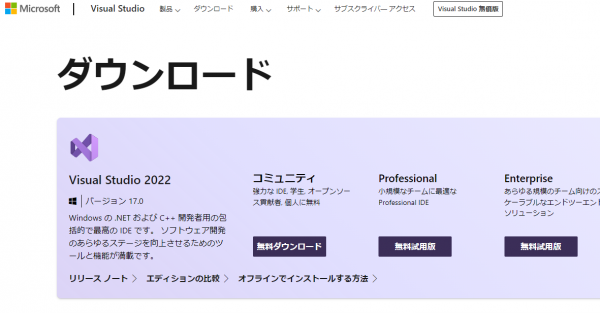
Visual Studioが入っていないので導入してみます。
- こちらからVisual Studioのコミュニティ版をダウンロードしてインストール
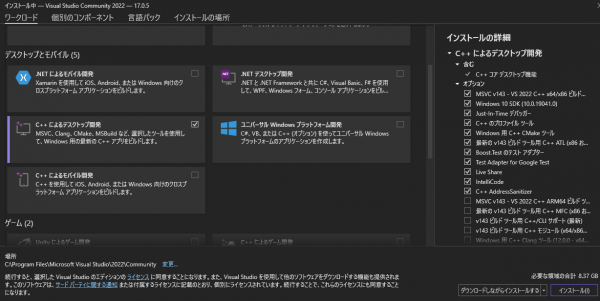
- C++によるデスクトップ開発のみチェックしてインストールしてみます。
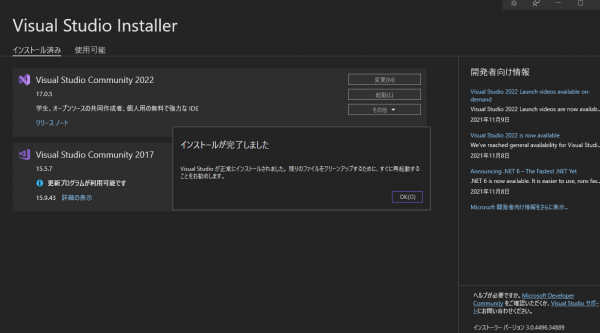
- インストールできました。


再度flutter doctorを実行してみると
Doctor summary (to see all details, run flutter doctor -v):
[✓] Flutter (Channel stable, 2.10.0, on Microsoft Windows [Version 10.0.22000.434], locale ja-JP)
[✓] Android toolchain - develop for Android devices (Android SDK version 30.0.3)
[✓] Chrome - develop for the web
[✓] Visual Studio - develop for Windows (Visual Studio Community 2022 17.0.5)
[✓] Android Studio (version 2021.1)
[✓] VS Code (version 1.63.2)
[✓] VS Code, 64-bit edition (version 1.26.0)
[✓] Connected device (3 available)
[✓] HTTP Host Availability

• No issues found!
エラーはなくなりました!
